


















Table of Contents
- • WebDiff Review Summary
- • About Webdiff
- • Other opinions about WebDiff
- • WebDiff Overview
- • WebDiff Review
- • WebDiff Personal review
- • WebDiff Duo Review
- • WebDiff Team Review
- • WebDiff Pros & Cons
- • Usage and Features
- • WebDiff Return Policy Details
- • WebDiff Shipping and Delivery
- • WebDiff Warranty Coverage
- • How to Contact WebDiff
- • Where to buy WebDiff?
- • Conclusion of WebDiff reviews & ratings
WebDiff Review Summary
WebDiff is a desktop application designed to help web developers and designers compare website versions, particularly live versus staging sites, to detect visual and technical differences efficiently. Operating locally on MacOS and Windows, it generally suits professionals needing thorough checks on WordPress updates, migrations, and site maintenance. Its performance is widely regarded as reliable and user-friendly, with rapid support and useful visual regression reports that enhance workflow confidence.
Highlights
- Best suited for freelancers, agencies, and web professionals managing multiple sites or complex updates.
- Offers comprehensive local comparisons including visual, SEO, source code, and network request analysis without cloud dependency.
- Trade-off: Relies on local storage, lacking cloud sync across devices and may trigger Windows Defender reputation flags.
- Overall evaluation: 7.8/10, a solid and practical tool balancing depth and some usability constraints.
Within the broader category of website comparison and regression tools, WebDiff offers a robust local alternative emphasizing privacy and detailed reporting. Alternatives might provide cloud-based syncing or faster comparison speeds but with potential security trade-offs. Those seeking a dependable desktop solution may find WebDiff's feature set and developer responsiveness valuable. For more detailed user perspectives, see the WebDiff review, which situates the tool thoughtfully among its peers.
About Webdiff
Updating websites often leads to unexpected issues like missing buttons or broken forms. These problems can cause frustration and delays, especially when managing multiple sites or complex plugins. Ensuring nothing breaks after updates is a crucial challenge for many web professionals.

WebDiff is a desktop application that fits into the website comparison and visual regression testing category. It allows users to compare live and staging environments by detecting visual and technical changes across pages. Designed for web developers and agencies, it offers an efficient way to catch errors before they affect users.
Users have given WebDiff strong ratings, often near 5 stars on platforms like AppSumo, praising its responsiveness and continuous updates. The software has become an essential part of workflows for freelancers and small teams managing WordPress updates and migrations. Its local application model ensures security but limits syncing across devices.
This WebDiff review explores how the tool balances ease of use with occasional security flags and storage limitations. It provides a clear picture of its value for professionals needing reliable, hands-on website comparisons. The review helps determine if WebDiff suits specific workflows and priorities.
Other opinions about WebDiff
Opinions and insights gathered from trusted review articles and authoritative websites covering WebDiff.
WebDiff Overview
WebDiff is a desktop software application designed for web developers and designers to compare websites before and after updates. Founded by the Italian software agency TangoDev, it operates as a locally installed tool supporting MacOS and Windows platforms. The service model focuses on one-time purchases without subscriptions, offering unlimited website comparisons for users ranging from freelancers to teams.
Originating from TangoDev, WebDiff was created to address challenges in managing website updates, migrations, and maintenance. Its development reflects a commitment to streamlining the detection of visual and technical changes across web environments. The product has evolved with continuous updates and feature additions, aligning with the mission to provide reliable, hands-on change detection without cloud dependencies.
Functionally, WebDiff serves a global user base requiring in-depth side-by-side website comparison including visual regression and SEO checks. It operates fully on local machines, ensuring data privacy and secure analysis without relying on third-party servers. With features such as sitemap imports and detailed reporting, it caters especially to freelancers, agencies, and professionals managing multiple websites. This framework defines WebDiff's role within the software comparison and web development tool category.
WebDiff Review
WebDiff is a software brand focused on delivering advanced website comparison solutions tailored for web developers and designers. Its primary goal is to streamline the verification process of website updates, migrations, and changes by offering reliable visual and technical comparison tools. The brand emphasizes local operation for enhanced security and privacy, catering to professionals who prioritize control over their data. WebDiff serves freelancers, agencies, and development teams seeking detailed and private site analysis capabilities.
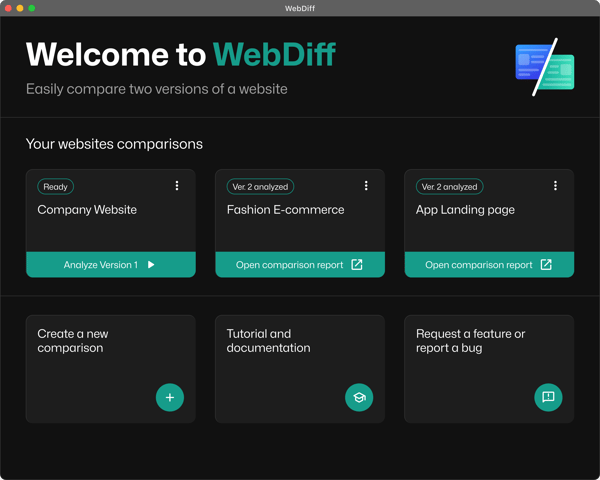
The brand offers a desktop application compatible with both Windows and MacOS, enabling users to run comprehensive website comparisons directly on their machines. WebDiff specializes in detailed visual diffs, SEO checks, source code inspections, and network traffic analysis. By focusing on local processing, it avoids cloud dependencies, ensuring confidentiality while maintaining responsive development driven by user feedback. The platform supports diverse web environments, including local, VPN, and network-hosted sites.
WebDiff Highlights- Robust local website comparison technology
- Supports visual, SEO, and source code analysis
- Operates on Windows and MacOS for broad compatibility
- Strong focus on privacy with no cloud reliance
- Active support and continuous feature enhancements
WebDiff Personal review
WebDiff Personal is designed for freelancers and offers a single-seat license for unlimited website comparisons without subscription fees. It supports both MacOS and Windows and allows URL imports manually or via sitemaps. This tool is suitable for users conducting detailed pre- and post-update checks on WordPress or other sites.
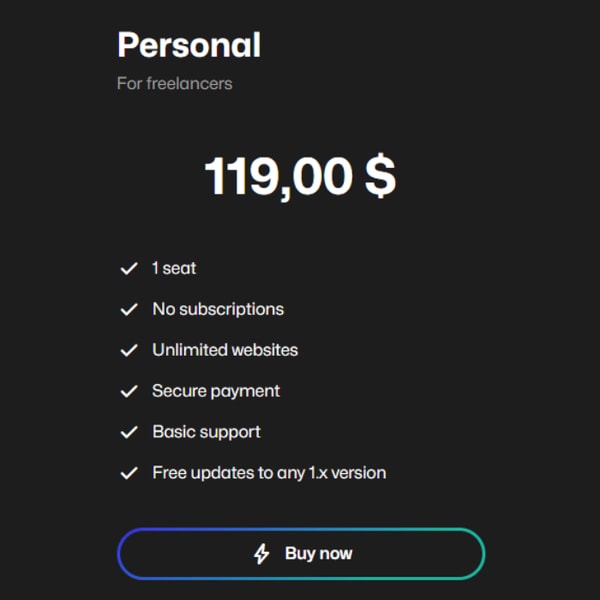
The software requires a one-time payment and enables hands-free background analysis along with detailed reports, including SEO audits and source code validation. It is a mid-tier product that runs locally, focusing on usability and privacy. Basic support and free updates for all version 1.x releases are included with the purchase.
Priced at $119.00 USD, WebDiff Personal positions itself as a secure and practical option for individuals seeking efficient website comparison and monitoring without recurring fees. It emphasizes local operation and privacy features, catering to freelancers and small-scale website managers.
Price $119 • webdiff.app
WebDiff Duo Review
WebDiff Duo is designed for small teams needing two user seats, maintaining all features of the Personal plan, including unlimited websites, local execution, and detailed comparison reports. It is suitable for agencies and small companies managing multiple client sites.
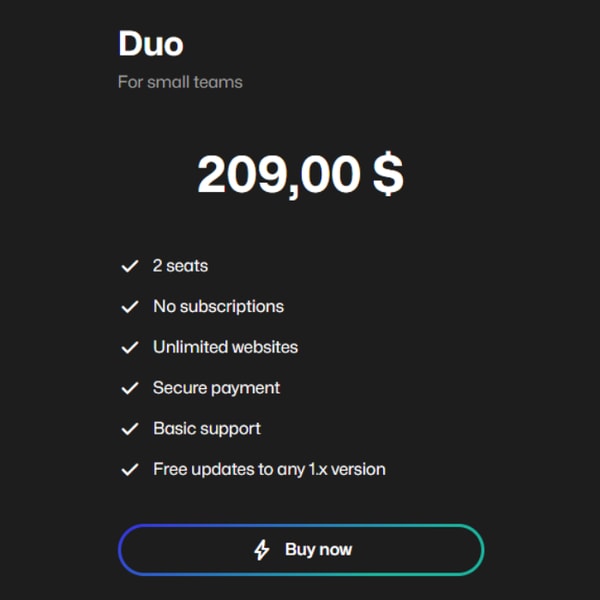
The plan focuses on secure, private analysis and ease of use across two workstations but does not support cloud synchronization. It is positioned at a mid-tier price point and targets collaborative team use.
The cost is $209.00 USD, which covers basic support and all updates within version 1.x, ensuring continued maintenance without additional charges.
Price $209 • webdiff.app
WebDiff Team Review
WebDiff Team targets teams and companies, offering five user seats with core features including unlimited websites, local desktop app functionality, and detailed visual and technical reports. It provides advanced support tailored to organizational needs, suitable for larger teams managing multiple projects requiring secure and reliable update verification.
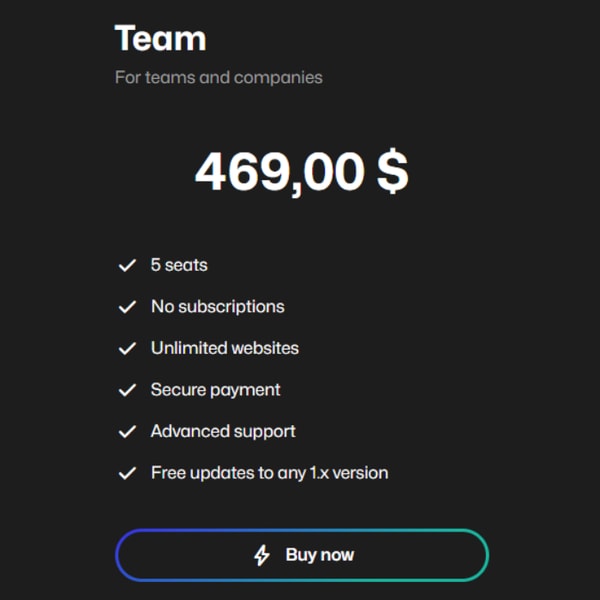
The plan follows a no-subscription, one-time purchase model with ongoing updates within version 1.x. It supports local, VPN, and network-hosted websites, designed for mid-tier professional users seeking collaborative tools.
The price is $469.00 USD, which includes advanced support and free updates within version 1.x. This version addresses the needs of teams requiring both collaboration and technical reliability in website change detection.
Price $469 • webdiff.app
WebDiff Pros & Cons
WebDiff offers detailed pixel-level and SEO comparisons, running locally to prioritize user security and privacy. It supports unlimited website comparisons without subscription fees and includes features like automated background analysis and URL imports via sitemap, making it suitable for large and varied testing needs.
While functional, the user interface could benefit from polishing, and the initial app launch may be flagged by Windows Defender SmartScreen, which might concern some users. Additionally, WebDiff does not support synchronization across multiple devices, limiting its convenience for users working on different machines.
- • Detailed pixel-level comparisons
- • SEO comparison features
- • Local operation enhances security
- • Unlimited websites and comparisons
- • Supports VPN and network testing
- • Automated background analysis
- • Sitemap URL import functionality
- • Responsive development team
- • Windows Defender SmartScreen warnings
- • No multi-device synchronization
- • User interface needs refinement
Usage and Features
WebDiff allows users to compare one or more URLs before and after website updates. Users can input URLs manually or import them automatically from sitemaps to handle large-scale checks. The application runs comparisons locally on Windows or MacOS devices, ensuring that sensitive data remains on the user's computer.
The tool generates reports with easy-to-understand traffic light indicators to highlight differences in visual layout, SEO attributes, internal and external links, source code, and network requests. Users can perform multiple analyses, adjust matches as needed, and export the results as PDF reports for sharing and documentation.
WebDiff Return Policy Details
We offer a 60-day money-back guarantee on eligible purchases, allowing customers to request refunds within this period. Returns processed within the policy window incur no additional fees. Refund requests must be submitted within 60 days from the date of purchase to qualify for the money-back guarantee.
Certain conditions apply based on the nature of the product, especially for digital products where usage limits or violations of terms may impact refund eligibility. Customers should review the specific terms associated with their purchase to understand any exclusions that may affect the return process.
WebDiff Shipping and Delivery
WebDiff delivers all purchases digitally, with no physical shipping involved. After completing a purchase, customers receive instant access to the software through a download link sent by email. The software is compatible with both Windows and MacOS systems, ensuring broad usability.
There are no delivery fees or shipping restrictions associated with the service. Access to the product is immediate upon purchase, requiring no additional activation steps beyond following the download link. Customers can begin using the software as soon as the confirmation email is received.
WebDiff Warranty Coverage
The warranty includes software updates and bug fixes for version 1.x of the product. It ensures that users receive necessary patches and improvements within this version range to maintain proper functionality.
This warranty does not cover compatibility issues that arise from third-party software or unsupported operating system versions. Additionally, hardware components are not covered under this warranty, so any hardware-related problems are excluded from service or repair.
How to Contact WebDiff
You can contact WebDiff for support, questions, or to report issues through multiple available channels. The team is responsive to user inquiries and feedback.
- Email: [email protected]
- Contact form and feature request tools are accessible within the WebDiff app and on the official website at https://webdiff.app/
If you need assistance or wish to share feedback, you are encouraged to reach out through these options. WebDiff's support team strives to respond promptly to user communications.
Where to buy WebDiff?
When considering a purchase for website comparison tools like WebDiff, the most reliable place is its official platform, accessible at webdiff.app. This site offers direct access to all product versions and transparent policies, ensuring authentic software alongside structured support and secure transactions. While third-party marketplaces may list WebDiff, those channels might not provide consistent policy coverage or timely updates. WebDiff is not available through offline retail outlets, underlining that the official website remains the primary source for full features and trustworthy service.
Conclusion of WebDiff reviews & ratings
WebDiff stands out in website comparison tools for its reliable performance and user-friendly design that helps developers and designers streamline their workflows. Its ability to deliver clear visual and technical comparisons, along with thorough reporting and local app security, makes it a valuable choice. Many users appreciate how responsive the support is and the continuous improvements that keep the tool up to date.
If you're considering WebDiff, exploring the official site can give you a clear sense of its features and benefits in action. The tool offers dependable functionality without unnecessary complexity, and you can always return to this WebDiff review for extra insights and details to help with your decision.
Editorial notes reflect aggregated buyer feedback and our independent editorial review of publicly available information. They are for informational purposes only and do not constitute endorsements. Purchases are made at your own discretion, and we are not responsible for transactions or outcomes related to this store. Experiences may vary. This content is assisted by AI and reviewed by our editorial team. While we strive for accuracy, AI-supported information may not always be 100% precise, so please verify any critical details.

